 Issue 02 · July 2026
TheSignal.
The Version of Tomorrow We Haven't Yet Met
Every complex environment is, in some sense, a prediction. The infrastructure laid today is a guess about what the property will need to do five years from now. The systems installed this quarter are a bet on the questions that will be asked next quarter, and the one after that.
Our work at LUCI is to make the prediction deliberately, so you have what you need before you know you need it. To build now for a version of tomorrow that hasn't fully arrived: infrastructure that will be vital in six months, support that's in place before the fire hits, capabilities that will matter before the need is obvious.
This issue picks up where June left off: a week at Tachi Palace that laid a foundation for what's next, a first look at the August release where the answer is already waiting in the system, and a Minute with Mike on bringing LUCI in early so we can help you plan ahead.
The version of tomorrow we haven't yet met is the one worth building for.
Here's what's inside.
Mike Epstein
CEO, LUCI Systems

Tachi Palace Casino Resort · Lemoore, California
Eight LED walls
Tachi Palace gave its bingo hall a full refresh — eight new LED video walls, displays and audio channels brought onto one platform, and a room ready to grow with the rest of the resort. One week, install to handoff.
The starting point
Tachi Palace was ready to bring its bingo hall into a full refresh — eight wall bays that had never held LED, and bingo and casino audio spread across racks that were ready to be consolidated onto one platform. The goal wasn't just to light up one room: it was to lay a foundation the whole property could grow onto.

What LUCI did
In one week on site, the LUCI team built eight LED video walls into the bingo hall, brought bingo and select casino audio onto a single platform, and consolidated the existing racks into a simplified LUCI stack. No parallel system bolted on top — less equipment, one place to run it from.


The results
Seven days from first panel to handoff. Here's what Tachi Palace runs now:
- Eight LED video walls, live in the bingo hall
- Bingo and select casino audio on one LUCI platform
- Scheduling, presets, and zone control from any authorized device
- Rack infrastructure simplified, not stacked on top of
- A foundation ready for the rest of the property to come onto LUCI


"Working with LUCI was smooth and easy, the team worked well together and with us completing the 8 LED Video Walls and all of the Casino Audio all in one week. Great Job Team!"
AV Telecom Manager Tachi Palace Casino Resort
Did you know you can manage lighting through LUCI?
Add lighting endpoints to your property map and they run alongside screens and audio; staff assigned to the venue can control them from the same interface, no separate system to track down.
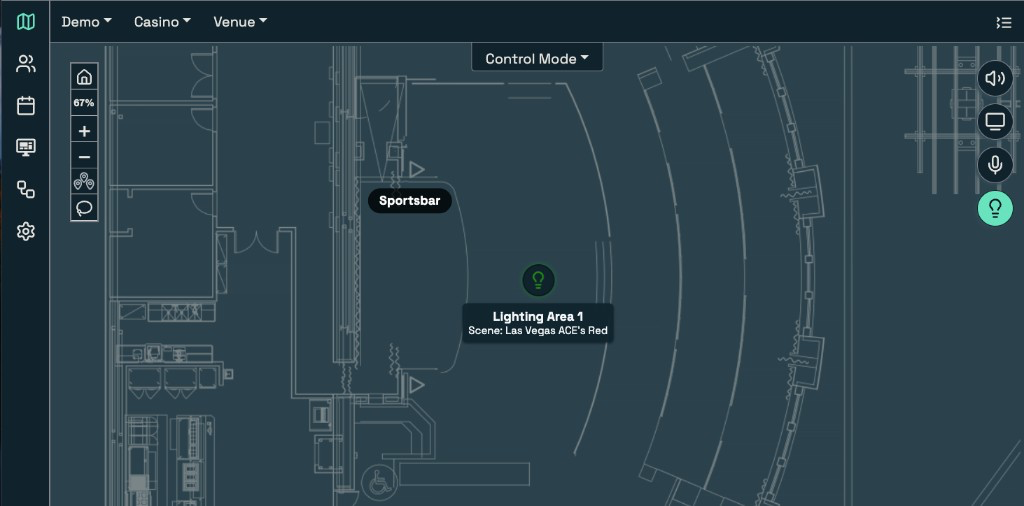
To add or edit a zone: Administration → Map Modes → Device Setup → Lighting. Navigate the map to your location, then right-click or long-press to Add or Edit Device. Name the endpoint, confirm the device IP, assign it to the venue, and Save.
Full admin guide in the Support Portal: tooltip placement, endpoint search, and v2.34.0+ setup.
What's coming in August
In June we said the next version of LUCI was built to think. In August it arrives, and the lead feature is one your team will feel the first time something on the floor changes and the answer is already waiting in the system.
LUCI introduces the Command Trail
On a live property, state moves constantly: an operator adjusts a zone, a scheduled preset runs for an event, a remote changes a display, another path touches the audio. In the new version of LUCI, you'll have those moments available in one Command Trail — attributed, correlated, and available to the roles that need them.
When a user runs a command or executes a preset, LUCI will attribute the action: who initiated it, which endpoints were affected, what changed, and whether it completed.
When a calendar event or auto-revert fires, the trail will mark it as system-triggered, so manual control and automation stay clear in the same record.
When a display or audio endpoint changes at the device — a remote, a front panel, another control path — LUCI will capture it and add it to the Command Trail.
One trail, every change
Every meaningful change will land in one place, including changes made outside the interface. Related actions will share a correlation path, so a multi-endpoint preset or a scheduled run reads as one story across the property.
Access that matches the operation. The same role-based access that governs the interface will govern the record behind it. Operators will get the control they need; admins will get the history they need. Teams act from the same operational picture.
Why it matters. Traceability is how a property stays reliable under real conditions: event days, overnight changes, staff handoffs, continuous operation. LUCI will give your team a clear way to verify what changed and keep the guest experience coordinated.
Set a revert preset
A drawing at three o'clock. A hot-seat call. A jackpot flash. There are moments you want every screen on the property to switch to the same thing — for just a minute — then snap back to exactly what was playing.
Build a preset for the moment, then set a revert. When it fires, LUCI snapshots every endpoint a second before, pushes your preset across the screens you chose, and after the window you set — sixty seconds for a drawing, longer for a hot seat — puts every channel, volume, and layout back where it was. No one walks the floor fixing TVs afterward.
To set one up:
01
Build the preset
Select the endpoints to take over — a zone, the TVs across the floor, or the whole property — and set them to the moment: the drawing slide, the hot-seat graphic, the jackpot feed.
02
Add the revert
In the scheduler, set the preset with a revert time in seconds. That’s the window LUCI holds the screens before it snaps back.
03
Schedule or hand it off
Drop it on the calendar for the three o’clock drawing, or assign it as a one-tap preset to the team that calls hot seats.
The payoff
What you get is the whole property flashing to the moment, then returning to exactly what was on — volumes, channels, layouts — without anyone touching a screen.
Want to wire up your first one? Your FDE can set a revert preset with you in a short call — same engineers, day one through year five.
Need a hand?
Guides, troubleshooting, and ticket submission live in the Customer Support Portal.
Same LUCI team, same LUCI engineers. Just another way in.
Design your lighting like there’s no control system
Mike Epstein shares hard-won lessons from decades as an integrator, operator, and owner.
Lighting is one of the most siloed systems in a property. The lighting consultant picks the fixtures and their brightness, the electrical engineer circuits them, the architect packages it, and the dimming gets figured out by whoever wins the bid — usually the electrician, usually last. Everybody along the way assumes the control system will sort out how it all actually runs day to day. So the lighting gets built as fixtures, circuits, and a dimming box — not as a complete system that’s ready to be run.
A control platform doesn’t create your lighting scenes or handle the dimming — it recalls scenes that already live in the lighting system. So if no one designed those scenes in, there’s nothing to recall, and no platform can make the lighting manageable after the fact.
“Design the lighting system the way you want it to run — completely, as if no one were controlling it.”
-
01
Make it stand alone
Put a keypad on the wall or a switch back-of-house, so the lighting works as a complete system on its own.
-
02
Save your scenes in the system
Build and save your scenes in the lighting system itself, so there’s something for a platform to recall.
-
03
Then when you add LUCI
It just recalls those scenes — the same way it recalls a channel on a display or a zone of audio.
LUCI doesn’t replace your lighting system or its dimming and scene engine — it integrates with whatever you’ve specified over standard protocols. It recalls those scenes as an endpoint on the map, assigned to a venue, over your existing network. No separate lighting network or operator — lighting joins displays, audio, and signage in one interface.
The same logic applies to A/V more broadly. It’s usually the last system thought of in a build, which is how a property ends up with a massive LED wall installed with no plan around it. Whether you’re building new, refreshing a venue, or bringing a sister property onto a shared platform, bring your A/V partner in while the plans are still moving. The earlier LUCI is in the room with your architect and electrical engineer, the fewer compromises you live with for the next ten years.
If a project is on your horizon — new build, renovation, or a sister property coming onto the platform — loop in your FDE before the plans are set. It’s a short conversation that changes what gets built.