 Issue 03 · August 2026
TheSignal.
The Difference Between Moving and Moving Forward
A property never holds still. Rooms change hands, crowds arrive and thin out, equipment fails and gets replaced, and every season rewrites the schedule. On a live property, motion isn’t an event. It’s the default condition.
But motion and progress aren’t the same thing. Throwing a new TV up when a monitor breaks is movement. So is bolting an entirely new system alongside the one you already run. Both leave a property busier without leaving it better, and over enough years the gap between the two shows up as a fractured guest experience.
Our work at LUCI is to keep every movement at your property pointed in the same direction — so that what changes this quarter builds on what changed last quarter instead of working against it. Always moving, always forward.
At LUCI, forward is the only movement that matters. In this issue we’re excited to show you how our work at Sam’s Town turned scattered motion into focused, intentional direction — a swath of mismatched TVs replaced with a beautiful, expansive LED wall, running on LUCI with the rest of the property. You’ll see how the new LUCI platform is skyrocketing forward, just weeks from its first beta property.
We’re here to move forward with you — because on a property that never holds still, forward is the only direction that counts.
Here’s how we’re doing it.
Mike Epstein
CEO, LUCI Systems
An LED wall this big usually isn't this simple.
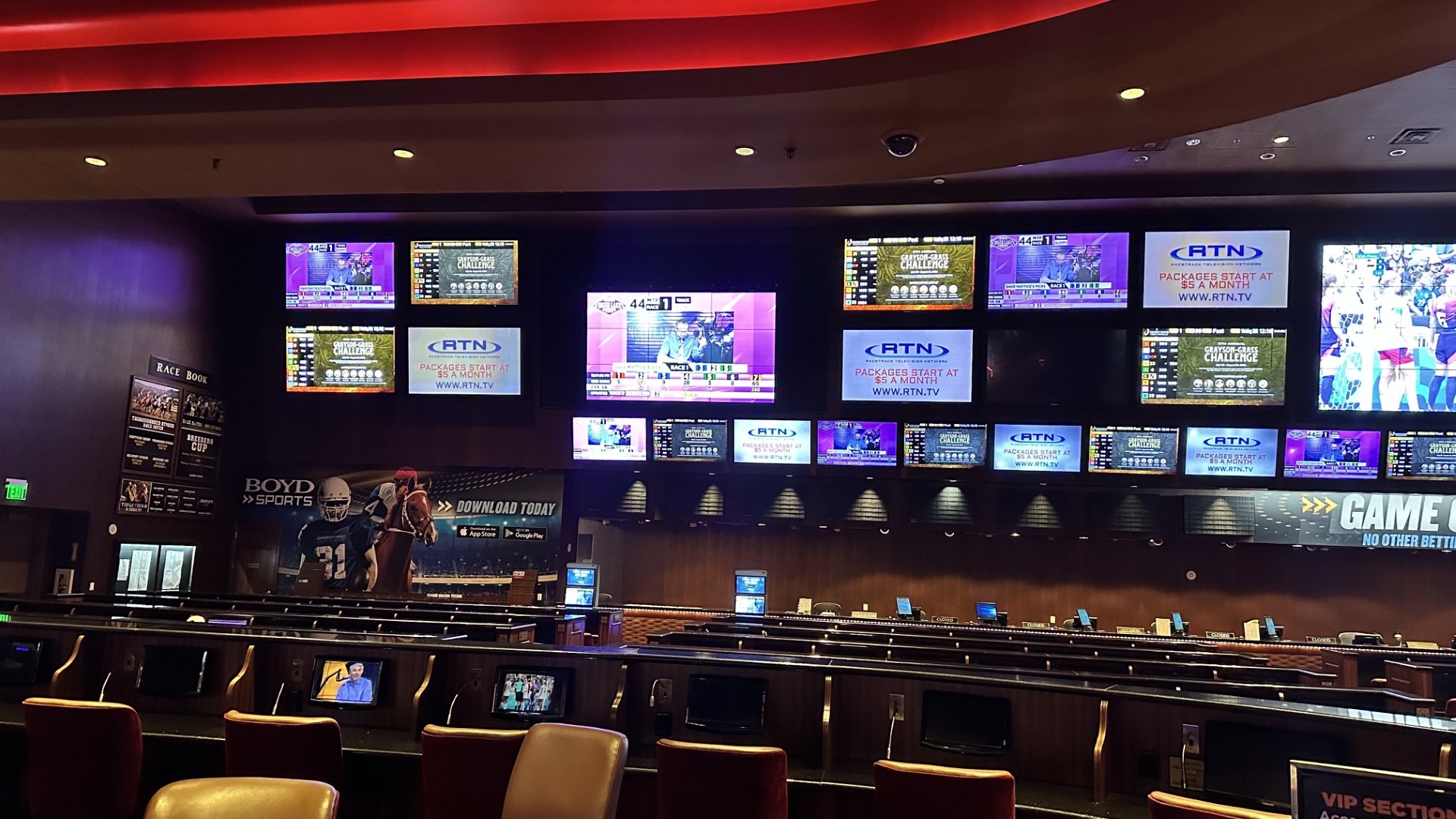
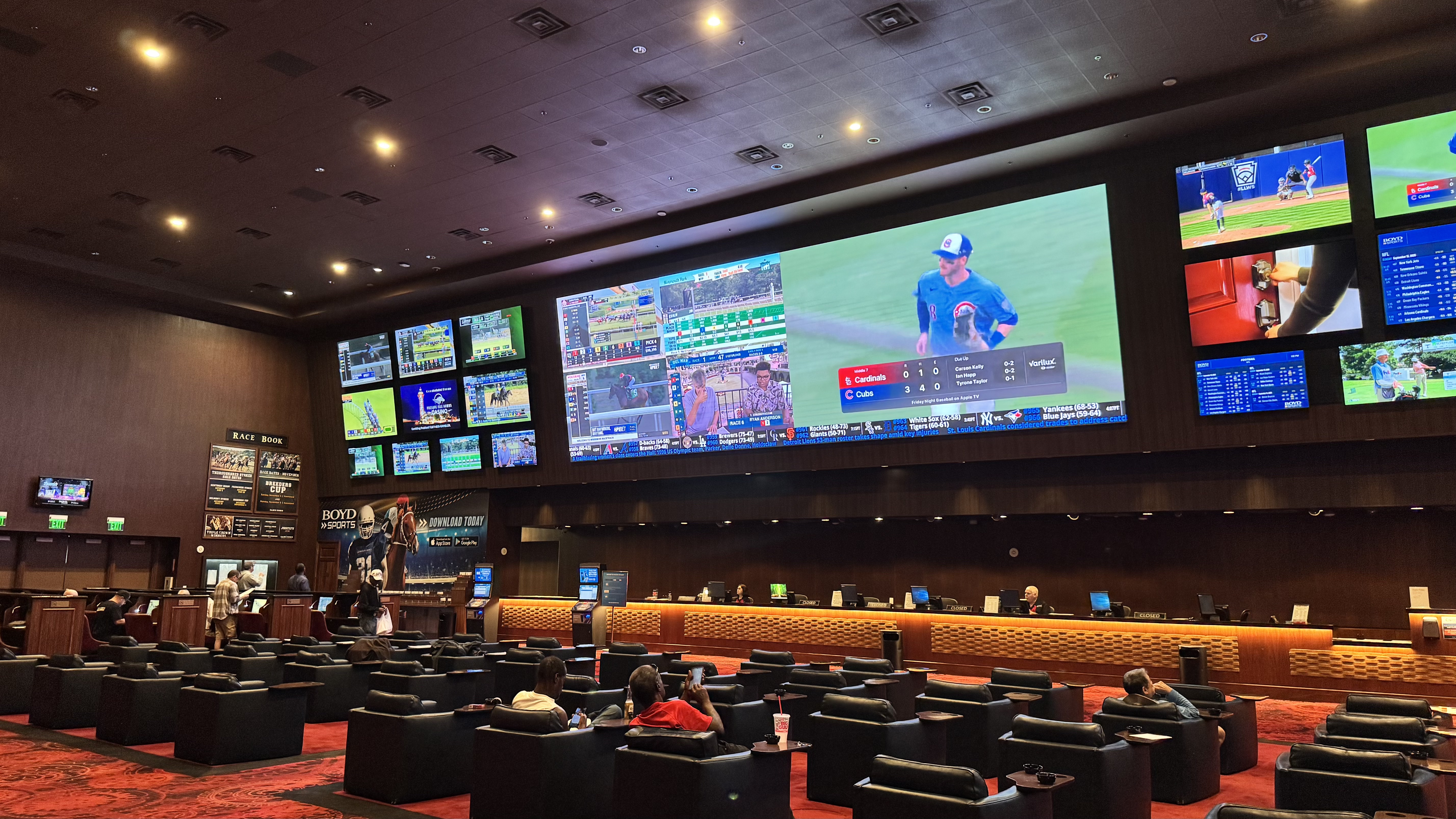
LUCI built the 480-square-foot wall where mismatched TVs used to be — nearly forty feet of unbroken video. Because LUCI already ran the property's A/V, the wall hooked right in: no second system, nothing for staff to relearn.
Sam's Town Hotel & Gambling Hall Las Vegas, Nevada
Nearly forty feet of unbroken video, fine enough to hold up from the front row.
The room they had
LUCI has run Sam’s Town’s A/V end to end for more than a year: we installed audio through the casino first, then video across the property, including the sportsbook. This year, Sam’s Town decided the sportsbook screens were due for an upgrade to replace years of accumulated TVs.
The wall they wanted
Sam’s Town decided to replace a large portion of their screens with one 39 × 12 foot LED wall — and commissioned LUCI’s team to install it. In less than a week, the LED wall, a new set of TVs, and the sportsbook’s three audio zones were all live and running on LUCI. The wall drives six presets across eight video inputs, all easily controlled from a single interface.
Bringing the race book on board
The race book took the same approach. Rather than trench new cable out to every betting carousel, LUCI sent ten channels of its own encoded video back out over the coax already buried under the property — live racing on existing cable, with no trenching and no new wire pulled through the floor.
What Sam’s Town runs now
- A 480-sq-ft LED wall — one display where there used to be many
- Six presets across eight video inputs, switched from LUCI
- Three audio zones on the existing system
- Ten channels of race video over existing coax — no trenching
Sam’s Town on LUCI to Date
- 143Video endpoints
- 88Audio zones
- 92DTV channels
- 45CMS/signage channels
- 4Content interfaces
One LUCI platform
Every endpoint, every zone, every channel — one interface.
Not every announcement should be the same volume
Most properties set one announcement volume for everything and adjust manually for each exception. But in LUCI, you can give your announcements a priority — low, medium, or high — and each priority has its own volume, per zone. Three priorities, three separate volume settings — not one shared level.
Here’s how.
Log in and switch the map to Control Mode, using the mode selector in the middle of the map.
In the endpoint type selector at the top left of the map, choose the Announcement icon.
Open Control Panel → Sources in the right menu bar. It’ll say No Audio Zone Selected.
Click a zone on the map. You’ll see its announcements with their Low / Medium / High / Disabled setting, and the current volume for each priority.
Use the Low, Medium, and High controls at the bottom of the Control Panel. Each one sets the volume for announcements at that priority, in that zone only.
Select more zones to change several at once. Watch the values update on each zone’s tooltip on the map and in the Sources sidebar.
Click a zone again to deselect it, or use the red X in the navigation bar to clear everything.
One thing that’ll save you a support ticket: When you have several zones selected, a change only reaches the zones that actually have announcements at that priority — so if a zone doesn’t seem to respond, check whether it has anything assigned at that level.
Full walkthrough: Announcement Control in the Support Portal.
What’s coming in the new LUCI
Sneak peek time. The new version of LUCI is close, and this is the first time we’ve shown any of it outside the company. Here’s a more detailed look at what’s coming.
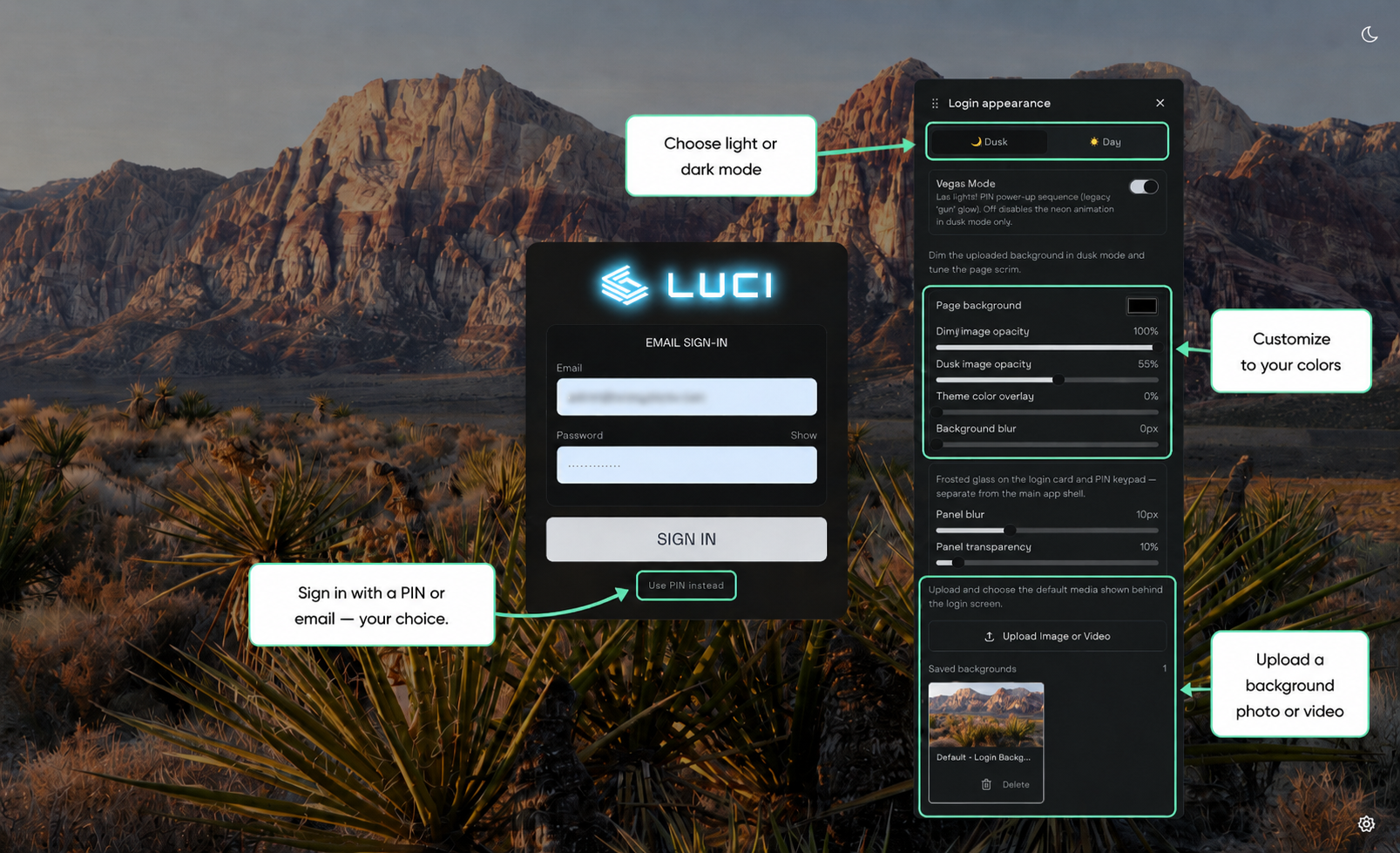
A new look — and it’s yours to set. New sign-in and splash screens, light and dark modes, and themes you can set to your own colors. The login screen itself is customizable, from the way you sign in to the background behind it.
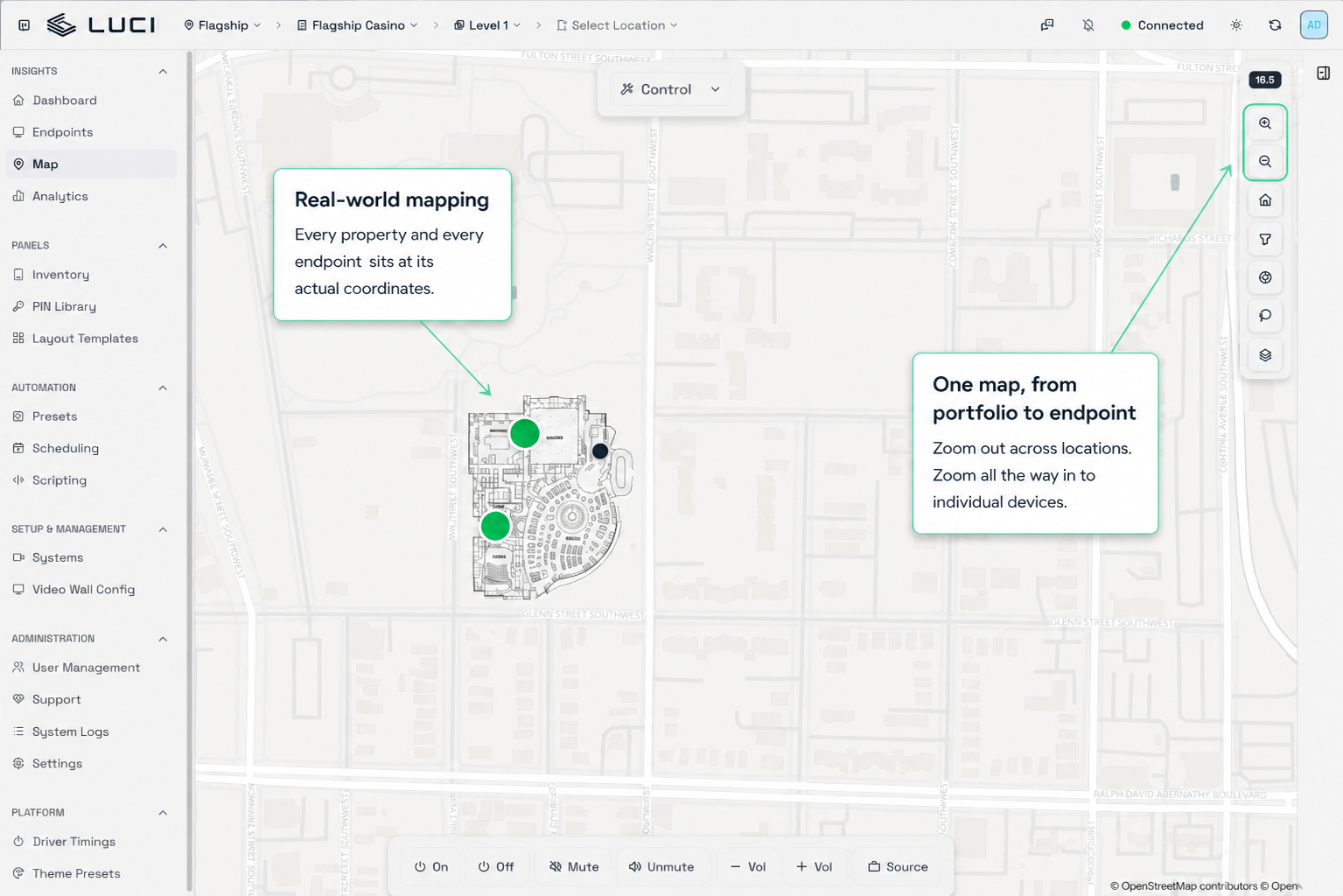
A map that matches reality. Every property and every endpoint now sits at its actual latitude and longitude, so your buildings and devices show up where they physically are. You can view all of your sites from within the platform and rotate the map as-needed.
And we’re not done. Preset and staging mode lets you build an entire change while the current state stays live, then apply it all at once. More coming soon on that feature and more.
Our first beta property goes live in the next thirty days; one step closer to getting all these future features into your hands.
Expect more screenshots and a lot more detail over the next few issues!
Need a hand?
Guides, troubleshooting, and ticket submission live in the Customer Support Portal.
Same LUCI team, same LUCI engineers. Just another way in.
A new LUCI website is coming this fall
This fall, lucisystems.com gets a full rebuild. The new site will give us a much better place to show you what LUCI is doing, what it can do, and what we’ve learned from years spent solving complex A/V problems in the field. We’ll point you there the moment it’s live.
See LUCI in action
Case studies, real-world use cases, videos and examples of how properties are putting LUCI to work.
From the people who know A/V
Ideas, observations and practical insight from people who’ve spent decades solving complex A/V problems in the field.
Keep up with what’s new
Product updates, new capabilities, company news and deeper looks at what we’re building.
We’re starting with case studies, use cases, videos, product updates and ideas from the field — and we’ll keep building from there.
Coming this fall. We’ll share the new site here in The Signal as soon as it’s live.
The best things we build aren’t our ideas
Mike Epstein shares hard-won lessons from decades as an integrator, operator, and owner.

Nobody knows a property like the people running it day in and day out. That’s why the best things we’ve built didn’t start with us — they started with a customer who partnered with us to work out a problem instead of just reporting it. That’s the part of this job I like most.
Here’s one I’d never have written down: a client asked whether LUCI could watch the weather. Not display it — watch it. They wanted to know when lightning was inside ten miles so somebody could start clearing the pool before the sky opened up. That isn’t an A/V feature. It’s an operations problem that happens to run on A/V infrastructure. We built it.
Another: someone wanted to know what was actually on the screens. Not the schedule — the reality. How many displays were carrying promotional content on a Friday night, and how many had drifted to something else. Put that next to what the floor did that night and you have a conversation you couldn’t have before. That request is why we’re building the analytics work we’re building.
Neither came out of a product meeting. They came from somebody describing an ordinary frustration to an engineer who happened to be standing there.
“The distance between ‘I wish it did this’ and ‘it does this’ is usually one conversation.”
So tell us. When your FDE is onsite, or when you’re on a call about something else entirely, mention the thing you’ve assumed is impossible. Some of it is. A surprising amount isn’t — and if you need it, three other properties probably need it too.
That’s how the roadmap actually gets written.